
Kids Coloring Pages For Boys
Piggy Panda IncEducational
4.649.00 Reviews
- Version
- 5.1
- Installs
- 10.00M
- Age Rating
- Everyone
Screenshots

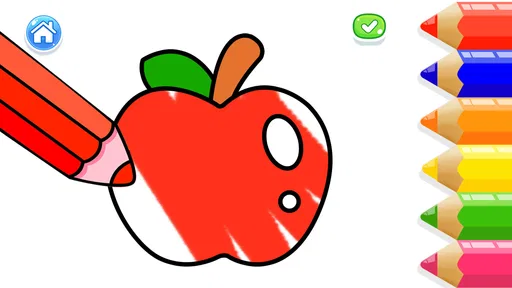


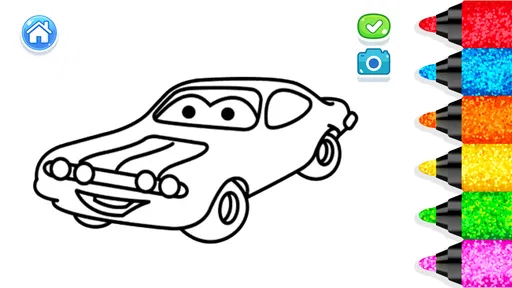
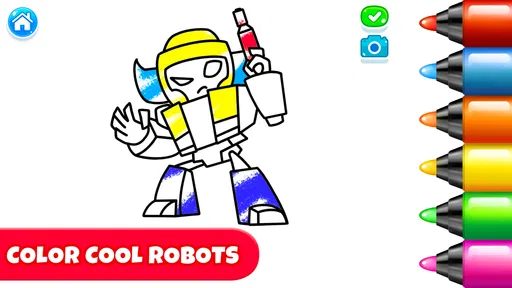


Our Review of Kids Coloring Pages For Boys
 Analysis by Appyee
I found Kids Coloring Pages For Boys most useful as a simple, low-pressure drawing game for children who enjoy choosing colors more than following complicated rules. It is an educational game from Piggy Panda Inc, aimed at everyone, and the basic download is free. After spending time with it, my impression is that its strongest quality is its straightforward approach: a child can open a page, pick a color, and begin creating without needing to understand a long tutorial first.
That simplicity matters when the player is young, still learning how touch controls work, or easily discouraged by games with many menus. At the same time, parents should see it as a casual coloring activity rather than a complete art-learning course. It offers an approachable place to practice selecting colors and moving a finger around a picture, but it will not replace paper, crayons, or a more advanced drawing tool for children who want detailed creative control.
How clearly the game works for different children
I find that the game’s clearest strength is how it lets children start coloring without first learning a complicated set of rules. That makes it easier to judge whether the activity suits a child’s patience, touch control, and interest in making color choices. I’d pay particular attention to how much help they need after the first demonstration, since that often matters more than whether they finish a picture.
Readability and navigation for early users
The most successful part of the experience is the basic path from opening the game to coloring. The idea is immediately understandable: choose a coloring page, select a color, and fill the picture. That direct structure is particularly helpful for children who cannot yet read confidently. They can learn through the visual appearance of the page and the obvious relationship between a color choice and the picture.
I also like that the activity does not depend on a complicated sequence of objectives. A child does not have to remember several instructions at once, manage a character, or respond to a timer before enjoying the main activity. For a preschooler using a device independently for a short period, fewer decisions can mean less frustration.
However, parents should still expect to guide a first session. Young children may tap several controls simply to see what happens, select a color accidentally, or leave a page before understanding how to return to it. The navigation may feel clear to an adult, but a child who is unfamiliar with touchscreens can need a brief demonstration. I would sit beside the child once, show the basic flow, and then let them try it without taking over.
The visual presentation is more important here than written explanations. Children who recognize symbols and colorful images more easily than text are likely to find the game approachable. Children with developing reading skills can also use it as a setting where the parent names colors and objects aloud. That turns an otherwise quiet coloring session into a small language exercise without making the game feel like homework.
One practical tip is to prepare the device before handing it over. I would close unrelated apps, set a comfortable brightness, and make sure the child is not likely to press system controls by mistake. These steps are not features of the game, but they make a noticeable difference for a young player whose attention is focused on the picture rather than the device.
Motor demands and sensory comfort
Coloring on a touchscreen is physically different from coloring on paper. The child needs to keep a finger on the screen and guide it with enough control to interact with the picture. That can be a comfortable introduction to digital drawing for children who enjoy tapping and swiping, but it may be tiring or imprecise for a child with limited fine-motor control.
I would not assume that a digital coloring game is automatically easier than crayons. A tablet removes the need to grip a crayon and manage several physical materials, which can help some children. On the other hand, the smooth glass surface provides less tactile feedback, and a child who presses too hard, moves quickly, or has difficulty isolating a finger may find the action unpredictable.
The best way to judge this is to watch the child during the first few pages. If they are repeatedly missing the intended area, becoming tense, or asking an adult to complete every section, the game may be demanding more precision than expected. Short sessions, a stable table, and a case that makes the device easier to hold can help. I would also avoid placing the tablet on a slippery surface where the child must use one hand to steady it constantly.
Sensory preferences vary just as much. Bright colors can be engaging for one child and overwhelming for another. A child who dislikes visual clutter may prefer a quiet page with fewer elements, while another may enjoy a more colorful scene. Because the activity is open-ended, I would let the child choose the pace and stop when the experience becomes tiring rather than treating completion as the goal.
There is a useful trade-off in the digital format: mistakes are less permanent than they are with a marker, so a cautious child may feel safer experimenting. That can encourage color choices without the fear of ruining a page. The opposite is also possible. Some children value the resistance and sound of physical materials, and they may lose interest quickly when the screen does not feel like real coloring.
Situational access at home and on the move
This game fits situations where a child needs a calm activity that can be started quickly. I can imagine using it during a short wait at a clinic, on a quiet part of a journey, or while an adult is preparing dinner nearby. Since the main activity is not built around fast reactions, it is better suited to those moments than an action game that demands constant attention.
It can also work well as a shared activity. An adult can ask the child to choose a color for a vehicle, animal, or object, then talk about why that choice feels right. A sibling can create a different version of the same kind of picture. This makes the app more socially useful than simply handing over a device as a distraction.
For travel, I would test the complete experience at home first rather than assuming every child will be comfortable with it immediately. A child who needs frequent help may become more frustrated in a car or waiting room where the adult cannot provide the same attention. The game is most convenient when the child already understands the basic controls.
The age rating of Everyone makes the intended audience broad, but that does not mean every child will use it independently. A younger child may need help with selecting a page, while an older child may find the activity too basic. In my view, the sweet spot is a child who enjoys visual play and is beginning to use a tablet with purpose, not a child looking for a deep drawing system.
It is also worth remembering that the game is free to install but includes in-app purchases ranging from $1.99 to $59.99 per item. I would check the purchase settings before giving the device to a child. The free starting point is convenient for testing whether the child actually enjoys the activity, but families should not treat the word “free” as a guarantee that every available item is included without additional cost.
Where the experience still creates barriers
The biggest limitation is the gap between simple navigation and genuinely flexible access. A clean interface helps, but it does not answer every need. Children with visual differences may need stronger contrast, larger controls, or a way to reduce visual stimulation. Children with motor differences may benefit from alternative input methods or more forgiving touch interaction. I would evaluate the actual screen with the child instead of assuming that a colorful design will suit everyone.
Another barrier is the lack of physical feedback. Paper coloring lets a child feel the edge of a shape, vary pressure, and understand progress through the marks left behind. A screen can be cleaner and less messy, but it can also make the activity feel less grounded. For children who learn best through touch, I would use the game alongside paper rather than making it the only creative option.
Adult supervision is also relevant to inclusive use. A child who cannot read instructions, distinguish small symbols, or recover from an accidental tap may need support. That is not a flaw unique to this game, but it changes how accessible the experience is in real life. The app is easier to recommend when an adult can provide an initial demonstration and occasional help.
Parents should also consider attention span. Coloring is slower and less immediately rewarding than many modern games. A child accustomed to constant animation may describe the activity as boring, while a child who prefers predictable repetition may find that same calm pace reassuring. I would not push the game as a universal solution for screen time; its value depends heavily on the child’s temperament.
Older children may encounter a different barrier: limited creative depth. If they want to draw from a blank canvas, control brush size, layer colors, or develop a personal illustration style, a dedicated art app will probably be a better choice. Kids Coloring Pages For Boys is more successful as guided coloring than as open-ended digital art. That distinction is important because the store summary may make it sound broader than the actual use case I experienced.
What makes it useful beyond the first session
The game becomes more worthwhile when parents use it intentionally. Instead of letting the child rush through pages, I would choose one picture and turn it into a small conversation: identify the objects, compare warm and cool colors, or ask the child to invent a setting for the finished scene. This adds learning without requiring a separate lesson plan.
A second useful approach is to use it as a transition activity. Ten quiet minutes of coloring can help a child move from energetic play to a meal, bedtime routine, or car journey. I would keep the goal short and specific, such as finishing one small section rather than completing an entire picture. That reduces pressure and makes stopping easier.
For children who hesitate to make choices, I would offer two colors instead of asking them to choose from everything available. For children who need more independence, I would let them select the page and explain their choices afterward. These small adjustments make the same game more suitable for different confidence levels without pretending that the app itself provides a personalized accessibility system.
A third insight is that digital coloring can be a useful comparison exercise. After a child finishes a page, give them a sheet of paper and ask them to recreate one part using crayons. The child can notice the difference between filling a digital area and controlling a physical tool. That makes the app a starting point for broader creative practice rather than a replacement for it.
I would also avoid judging the result by how neat it looks. If the child is practicing touch control, color recognition, or decision-making, an imperfect picture can still represent meaningful progress. The game works best when the adult values the process and conversation instead of turning every page into a test.
Performance, cost, and device expectations
The current version is 5.0 and requires Android 8.0 or later. That gives families a clear compatibility check before installation. If a child uses an older Android device, I would verify the operating system first rather than promising that it will run. On a supported device, the main question is less about demanding gameplay and more about whether the screen is comfortable for the child to see and touch.
The game has reached over ten million installs and holds a 4.6 average from around nineteen thousand ratings. Those figures suggest that it has found a substantial audience, but they do not tell me whether it will suit a particular child. I would treat the popularity as a reason to try it, not as proof that every family will find the controls or visual style ideal.
Because the game is free to start, it is easy to make a low-risk first assessment. Let the child use the available coloring activity several times, at different times of day, before considering any purchase. If the child only enjoys the novelty for a few minutes, spending more will not solve that problem. If the child returns willingly and the extra content would support a regular routine, the family can make that decision with clearer evidence.
The developer is Piggy Panda Inc, and the game is categorized as educational. I think that label is reasonable when the activity is used for color vocabulary, hand-eye practice, and guided conversation, but I would not present it as a structured curriculum. Its learning value comes mainly from how the adult frames the activity and how the child engages with it.
Who should choose it, and who should look elsewhere
I would recommend it to parents looking for a gentle coloring activity for a young child who likes pictures, simple choices, and short creative sessions. It is especially appealing when the child is not ready for a complex drawing interface and the adult wants something more purposeful than a random video. The familiar coloring format makes it easy to explain and easy to revisit.
I would be more cautious if the child has significant difficulty with touchscreen precision, sensitivity to bright visuals, or a strong need for tactile feedback. In those cases, physical coloring materials may be the better first choice, with the game introduced only if the child shows interest. A specialized tool designed around particular motor or visual needs may also be more appropriate than a general children’s coloring game.
Older children who want artistic freedom should probably skip it in favor of an app with a blank canvas and more drawing controls. Likewise, families seeking lessons in drawing technique, spelling, mathematics, or a measurable progression will likely be disappointed. The educational benefit here is informal and activity-based rather than organized like a course.
My inclusive verdict
After using Kids Coloring Pages For Boys, I see it as an approachable first step into digital coloring, with a clear enough core activity for many children and enough flexibility for an adult to adapt the session. Its strongest inclusive quality is not a specialized setting; it is the low-pressure nature of choosing colors and creating at an individual pace.
Its limits are just as important. Touch precision, screen brightness, visual complexity, age, and the child’s preference for physical materials can all change the experience. The free download makes testing sensible, but the in-app purchase range deserves adult attention before independent use. I would introduce it briefly, watch how the child interacts with the screen, and keep paper and crayons available.
My honest recommendation is to treat it as a calm creative tool, not a complete learning program or a universal accessibility solution. For the right child, it can support color language, confidence, and quiet independent play. For a child who needs richer art controls, stronger physical feedback, or highly tailored access options, another format will be the better choice.
Privacy and Permissions
See what permissions an app requests and how it handles your data.
- Photos/Media/Files
- read the contents of your USB storage, modify or delete the contents of your USB storage
- Storage
- read the contents of your USB storage, modify or delete the contents of your USB storage
- Other
- view network connections, full network access, control vibration, prevent device from sleeping
Verdict
Strengths of Kids Coloring Pages For Boys
- Simple controls make it easy for young children to color independently.
- Bright illustrations offer a variety of subjects that appeal to boys.
- Offline access allows coloring without Wi-Fi or mobile data.
- Tap-to-fill tools help children complete pictures without precise drawing skills.
- Coloring activities can support creativity, focus, and hand-eye coordination.
Limitations of Kids Coloring Pages For Boys
- Some pictures or tools may be locked behind ads or in-app purchases.
- The selection may feel limited for older children seeking more detailed designs.
- Frequent advertisements could interrupt play on the free version.
- Basic coloring mechanics may become repetitive after extended use.
- Privacy settings should be checked carefully before allowing children to use it.
Other Releases by Piggy Panda Inc
View All
Car Makeover: ASMR Games
Role Playing4.3

Cake Maker: Kids Cooking Games
Role Playing4.3

Pizza Maker Kids Cooking Games
Role Playing4.6

ABC Games: Tracing & phonics
Educational4.4
Similar Picks in This Category
View All
Little Panda Policeman
BabyBus4.0

Monster Trucks Game for Kids 2
Raz Games4.1

Little Panda's Chinese Recipes
BabyBus4.4

Little Panda's Restaurant
BabyBus4.4

Little Panda's Ice Cream Games
BabyBus4.3

Baby Panda Care
BabyBus3.8
Frequently Asked Questions
What is Kids Coloring Pages For Boys?
Kids Coloring Pages For Boys is a digital coloring app designed for young children who enjoy drawing, coloring, and exploring playful illustrations. It typically includes themed pages featuring vehicles, dinosaurs, animals, superheroes, robots, sports, and other subjects that may appeal to boys. Children can choose colors, fill different areas, and create their own artwork directly on a phone or tablet.
Is Kids Coloring Pages For Boys suitable for young children?
The app is generally aimed at preschool and early-school-age children, but the best age range may depend on the child’s familiarity with touch-screen controls. Simple coloring tools make it easy for beginners, while older children may enjoy adding more detail to their pictures. Parents should review the listed age rating, available content, and privacy information before allowing independent use.
Does Kids Coloring Pages For Boys require an internet connection?
Many coloring apps allow users to open and color previously available pages without a constant internet connection, which can be useful during travel or when children use a tablet away from home. However, internet access may still be needed for downloading the app, loading additional picture packs, displaying advertisements, syncing data, or using any online features. Check the store description for the current offline limitations.
Is Kids Coloring Pages For Boys free to download and use?
The application may be available as a free download, but free versions can include advertising, locked coloring pages, optional purchases, or premium tools. Before installing it, parents should check the Google Play Store or Apple App Store listing for pricing details and in-app purchase information. It is also sensible to enable parental controls so children cannot accidentally buy extra content.
Is Kids Coloring Pages For Boys safe for children?
The coloring activity itself is designed to be child-friendly, but safety also depends on advertisements, external links, permissions, and any data collected by the developer. Parents should inspect the app’s privacy policy, age rating, and review history, then test it before handing it to a child. Disabling purchases and supervising ad-supported versions can provide additional protection during use.
Play our best games!


